
Labels and organisation
Classify and filter projects and tasks with scoped, colour-coded labels that give connected AI agents useful guidance.
BeginnerAdd another way to find work
Labels add a classification layer to projects and tasks, alongside each project’s workflow columns and status. A label can be global or scoped to one project. Create and apply labels through the dashboard or a connected AI service, then search or filter work by them.
Labels can answer questions such as what kind of work a task is, which agent it is intended for, or what context matters when it is done. For example, a Shopping project could have a label for each local store. When you are visiting one, filter the project to see outstanding purchases associated with that shop.
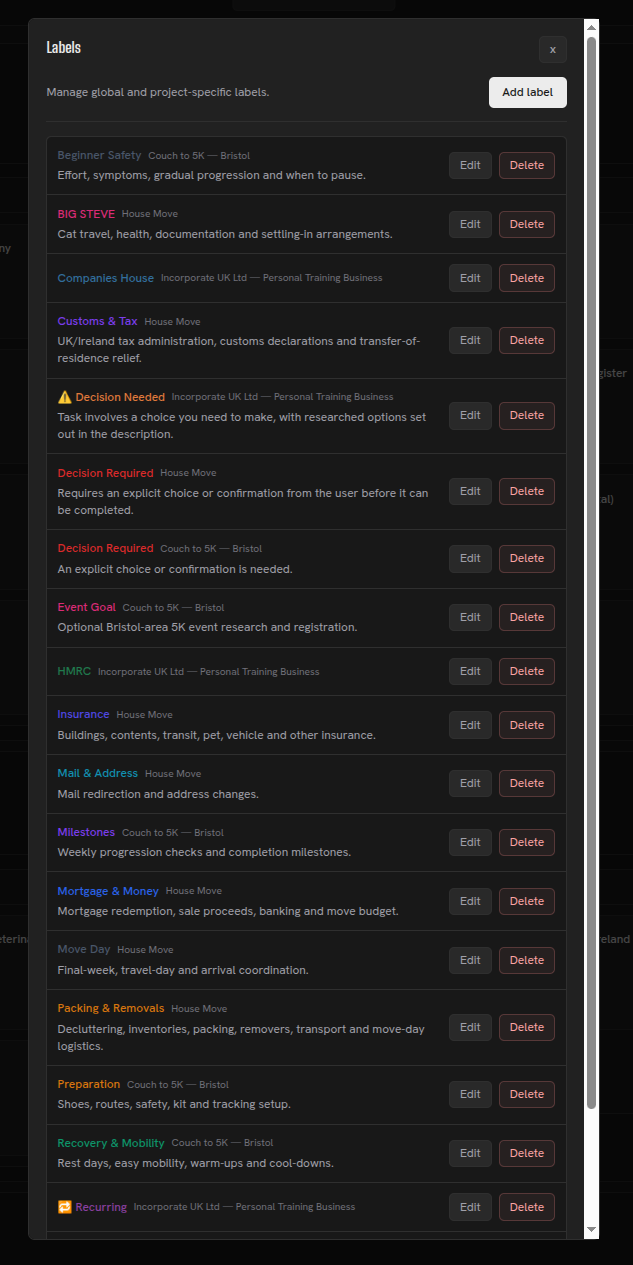
Create labels with a name and a colour that makes them easy to recognise.
Every label in Herculean also has its own description, and these descriptions play an important role in helping your AI agents understand how you’ve organised your work.
Rather than simply assigning a name or colour to a label, you can explain what it represents, when it should be applied and how tasks or projects associated with that label should be handled.
Your connected AI services can then use these descriptions to understand the purpose behind your labels, automatically apply appropriate labels to tasks and projects, and follow relevant instructions when working with labelled items.
For example, a label representing a particular retailer could explain what products you typically purchase there. Your AI agent could then use that information to categorise shopping tasks, research suitable products and help organise your purchases.
Labels become more than a way to categorise your work. They become another source of meaningful context that helps your AI understand your intentions and work the way you want it to.
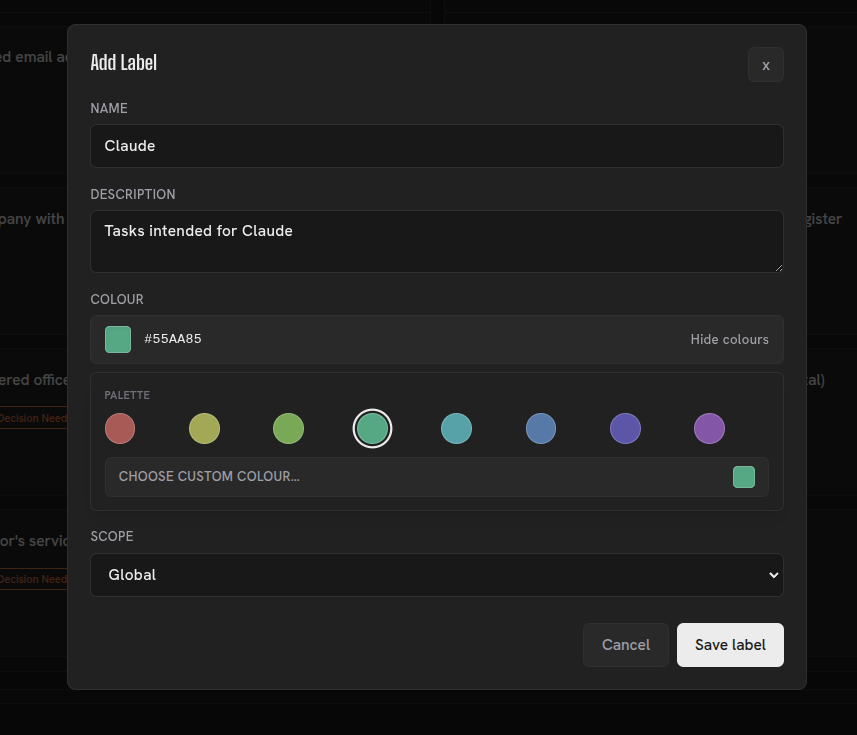
Examples of Herculean labels
Labels appear in real plans too: the UK company setup uses labels to flag decisions and recurring work, the international house move groups tasks by category, and the Couch to 5K plan includes seven beginner-focused labels.
Agent orchestration
I use a Codex label to identify work intended for a Codex agent. Other labels might describe a model, desired reasoning effort or practical terms such as Overnight for a task I want to run overnight.
AI services can search for tasks & projects with specific labels, so you can prepare a pool of work without directing each task individually.
Labels can also be combined in a configured workflow. For example, my overnight agent looks for tasks with both labels Codex and Overnight to automatically pick up work from the backlog I want it to work through at 3am.
Additionally, my global labels include the selection of models that I use and the thinking levels available, so I - or my agents - can tune the level of effort assigned to each task.
Combined with memories
Labels become particularly powerful when combined with Herculean’s Memories, allowing you to build practical systems that your AI agents can understand and operate on your behalf.
Shopping is a great example.
In my Shopping project, I have labels representing my preferred retailers. I also have a project-level Memory instructing my AI agents to check those labels, prioritise the retailers I prefer and search their websites when researching products I need to purchase.
When an agent creates a shopping task, it can research suitable products, include relevant purchase links and apply the appropriate retailer labels.
Later, when I’m visiting a particular shop, I can simply ask my AI, “What do I need to buy from this retailer?”
My agent can check the outstanding shopping tasks associated with that retailer’s label and generate an up-to-date shopping list on the fly.
Another practical example is organising work around the weather. The New Tab weather forecast can help you decide when weather-dependent tasks are practical.
I have a global label for tasks that require good weather, particularly dry conditions and temperatures above freezing.
This label applies across multiple projects to activities such as concrete work, digging and general outdoor maintenance.
Rather than manually searching through projects whenever the weather improves, I can ask my AI agent to identify outstanding tasks with the Good Weather label, check the forecast and suggest suitable work for the coming days.
This makes it easier to plan weather-dependent activities around actual conditions rather than arbitrary deadlines.
These examples demonstrate why labels in Herculean are much more than simple categories.
Combined with descriptive labels, Memories and AI integration, they become a flexible way of connecting your responsibilities to real-world circumstances, preferences and opportunities.
You organise the information once, and your AI agents can continue using that context whenever it’s relevant, reducing the amount of repetitive planning and administration you need to do yourself.
Projects answer where work belongs; columns show where it is in the workflow; labels add answers to other useful questions. See delegation and agent workflows for how connected agents can search labelled work.
Related content
Continue with other guides and examples connected to this topic.
Conversational organisation
Turn loosely spoken or written thoughts into Herculean projects, tasks, dependencies, Memories, and labels with a connected AI.
BeginnerDashboard
See active projects and task status together, edit work on the board, and keep completed tasks out of everyday view.
BeginnerSettings
Manage board behaviour, New Tab and Pirate Weather options, calendar privacy, modal behaviour, and account access from one panel.
Beginner