
Dependencies and diagrams
Link prerequisite tasks across projects and explore how work connects in an interactive dependency graph.
AdvancedDependencies are a fundamental concept in project and task management. They establish relationships between tasks, identifying which activities must be completed before others can be finished.
Beyond simply controlling the order of work, dependencies provide valuable insight into planning, progress and priorities.
By mapping dependencies, you can understand how tasks relate to one another, identify the stages required to achieve an outcome and recognise critical tasks that many other activities depend upon.
This is particularly useful when a single unfinished task is preventing progress across several others.
Herculean also allows you to visualise dependencies as a connected graph, revealing the structure and flow of your work beyond the traditional Kanban board.
There’s something particularly satisfying about seeing an entire project mapped out visually, understanding how everything connects and recognising exactly what needs to happen next.
Dependencies turn a collection of individual tasks into a connected plan for achieving your goals.
How dependencies work
Dependencies in Herculean are simply links between tasks.
Every task can have two types of relationships:
- Prerequisite tasks: Tasks that must be completed before the current task can be completed.
- Dependent tasks: Tasks that rely on the current task being completed before they can be completed.
These are actually the same relationship viewed from opposite directions.
If Task B requires Task A to be completed first, then Task A is a prerequisite of Task B, and Task B is dependent on Task A.
That’s all there is to it. By linking tasks together, Herculean can establish the order in which work needs to be completed and visualise those relationships in your dependency graph.
A better alternative to more columns
Throughout Herculean, we recommend sticking to the four default workflow columns: Backlog, In Progress, Review and Done. These provide a simple, tactical view of your work, showing what needs doing, what’s underway, what requires attention and what’s finished.
Dependencies add an entirely different dimension. They establish relationships between tasks, helping you answer two important questions: “Now that I’ve finished this, what’s next?” and “Before I can do this, what needs to happen first?”
More importantly, Herculean’s dependency graph allows you to visualise the wider structure of your project, identify critical tasks and understand how different activities contribute to the overall outcome.
Your Kanban board gives you the tactical view of what you’re doing right now. Your dependency graph gives you the strategic view of how everything fits together.
Creating dependencies
Creating dependencies in Herculean is straightforward. You can link tasks directly through the dashboard or task editor, selecting any task from any project.
Dependencies work across projects, so a task in one project can depend on work happening elsewhere. For example, a construction task might depend on purchasing materials tracked in your Shopping project.
Your connected AI agents can also create and manage dependencies automatically.
When describing work naturally, you might say, “We need to finish this first, but before we can do that, we need to complete something else.” Your AI can interpret these relationships, create the necessary tasks and link them appropriately.
For larger projects, you can explicitly instruct your AI to identify and establish dependencies across all the tasks it creates.
Several of our real-world examples demonstrate this approach, with AI agents building complete project plans containing interconnected tasks and dependency relationships: setting up a UK company, planning an international house move and building a Couch to 5K plan.
Visualising dependencies
Dependencies aren’t just visible on your Kanban board or understood by your AI agents. Herculean also provides an interactive dependency graph that lets you visualise how tasks connect across your projects.
Built using Mermaid.js, a widely supported diagramming framework, the graph is accessible from each project’s dedicated page or directly through the main dashboard.
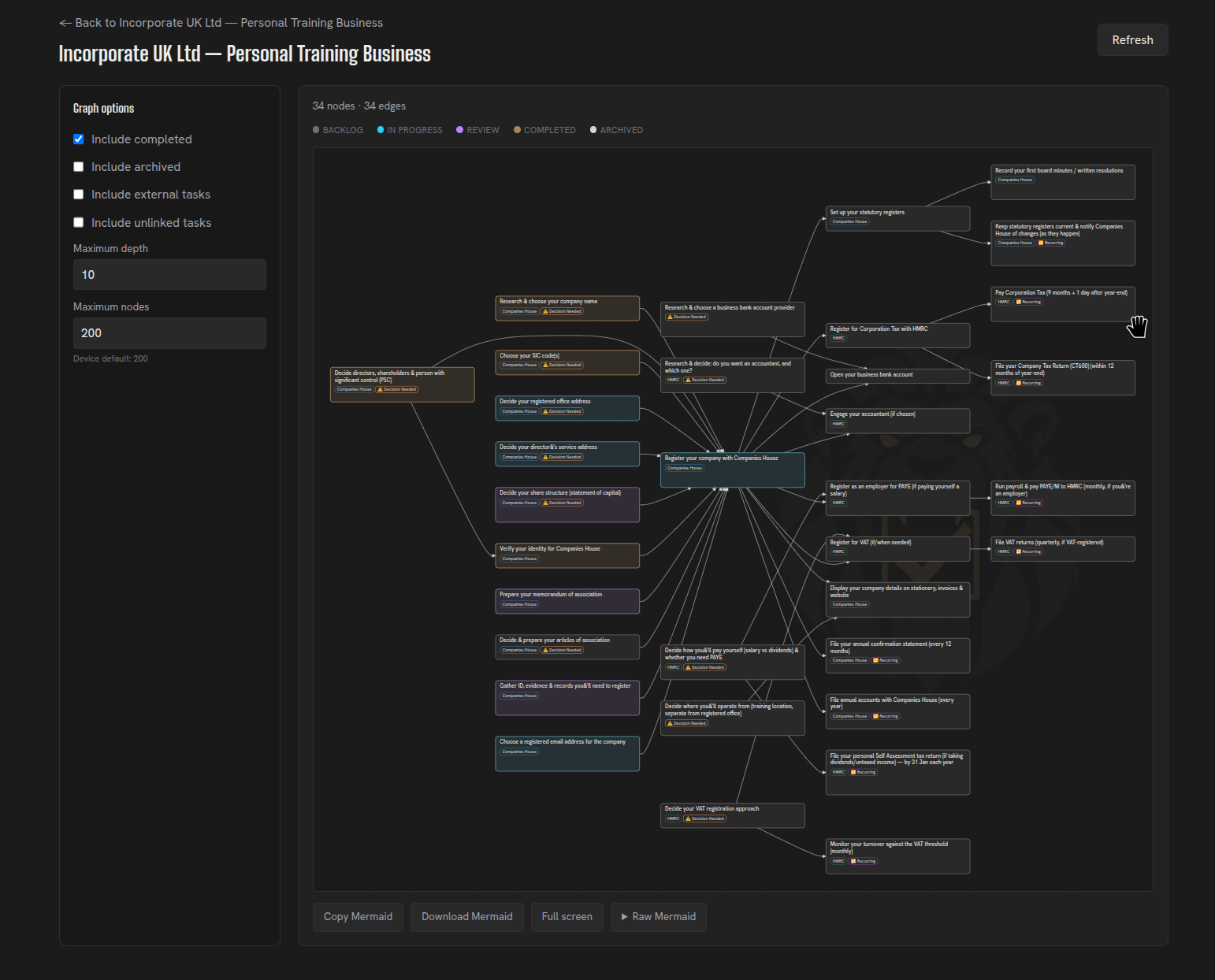
Herculean enhances these diagrams with additional capabilities:
- Colour-coded tasks: See task progress and status, including completed and archived work.
- Cross-project dependencies: Visualise relationships between tasks belonging to different projects.
- Interactive navigation: Click tasks directly within the graph to open and inspect them.
- Complete project visibility: Understand the sequence of work, identify critical dependencies and see how everything fits together.
Because Mermaid.js uses a standard text-based diagram format, you can also export your dependency graph for use in documentation, external tools or conversations with your AI agent.
However, Herculean’s interactive diagrams include custom enhancements that aren’t preserved in standard Mermaid exports. So if you want the best fully supported experience, use the Dependency Graph in Herculean directly.
Learn how projects and tasks fit together, how workflows and columns show task status, or how delegation and agent workflows can make use of task dependencies.
Related content
Continue with other guides and examples connected to this topic.
Delegation and agent workflows
Give connected AI agents task context, ask them to research or organise work, and review their results in Herculean.
AdvancedInternational House Move
Using Herculean to plan an international move
IntermediateNew Tab
Review selected Herculean projects or tasks in your browser's New Tab, check local weather, or search and prepare an AI prompt.
Beginner